
Monday, half past ten. A member steps up to your counter and asks what sounds like an easy question: how much of my loan is left, and when does my recurring deposit mature? Your clerk pulls out the loan register. Wrong book. He tries the deposit register, then the share ledger, because someone has to check that too. Fifteen minutes later the member has his answer, and four people are waiting behind him, none of them smiling.
That is not a staff problem. It is a system problem, and it is exactly what a good nidhi software company is supposed to fix. This guide walks you through how Nidhi software actually works, what a proper nidhi software solution should include, and what to test in a nidhi software free demo before any money changes hands.
Why a Nidhi Can’t Run on Ordinary Loan Software
A quick refresher first, because the software only makes sense once you see the rules it has to obey.
A Nidhi is a mutual benefit company. Members save together and borrow from the same pool. That is the whole idea, and it explains why the rulebook is stricter than most people expect. It comes from Section 406 of the Companies Act, 2013 and the Nidhi Rules, 2014. A Nidhi takes deposits from members only, and it lends to members only.
Within a year of incorporation it needs at least 200 members, and the count can’t slip below that afterwards. Deposits can’t pile up beyond 20 times net owned funds, the famous 1:20 ratio. At least 10 percent of outstanding deposits must sit in unencumbered term deposits. And twice a year there is a return to file, Form NDH-3, covering members, deposits and loans.
Now picture the average loan software, the kind built for banks and NBFCs. It doesn’t care who walks in. Anyone with a PAN card gets a loan file. For a Nidhi, that is a compliance problem waiting to happen. Excel isn’t much better. It stores numbers happily but enforces nothing, and anyone can overwrite a cell without leaving a trace.
So when you go looking for a nidhi software company, you want a team that has read the Nidhi Rules and built them into the product. A lending tool with “Nidhi” pasted on the login page doesn’t count.
One more thing. The rules get amended (2019, 2020 and 2022 all brought changes), so check current limits with your CA or company secretary before you configure anything.
How Nidhi Software Works, Step by Step
Forget the feature list for a moment. The easiest way to understand Nidhi software is to follow one member through it. We’ll call her Meera. She is invented, but her journey will look familiar.
1. Meera joins: registration and KYC
Meera walks in on a Tuesday to become a member. The clerk enters her name, address, photo, signature, ID proofs and nominee. The software gives her a member ID, but before saving anything it checks whether she already exists under another spelling. Meera, Mira, Meera Devi. You know how it goes. If a document is missing, the system won’t open her account until someone uploads it.
There is a side benefit nobody mentions at demos. Every new member bumps a live counter, so you always know how far you are from 200, or how comfortably you sit above it.
2. Her shares go on the ledger
A member of a Nidhi is also a shareholder, so Meera is allotted equity shares and the software records them in her member ledger. It looks like paperwork. It isn’t. This entry feeds your net owned funds figure later, so a mistake today quietly skews the 1:20 ratio you report six months from now. Nobody enjoys explaining that to an auditor.
3. She opens a recurring deposit
Meera decides to set aside a fixed amount every month. Your deposit products (savings, fixed, recurring) are already set up in the software, so the clerk picks one and the interest rate, tenure and payout rules come attached. From then on the system does the boring work. It tracks each installment, calculates interest, deducts TDS where it applies and sends a maturity alert before the date. Renewal or early closure happens on the same screen.
Here is what a good system does that a register never could. Before it accepts a new deposit, it checks your running total against the 1:20 limit. If you are close to the ceiling, it tells you before you cross it, not after.
4. Six months later, she needs a loan
This is the busiest stretch of the whole chain, so let’s slow down. Meera applies for a loan against her gold. Staff record the amount, the purpose and the security. (Nidhi loans are secured, commonly against gold, property or the member’s own deposits.) The software stores the valuation and works out the maximum she is eligible for on that security, so nobody is doing mental math at the counter.
Once an authorised person signs off, the loan is disbursed and an EMI schedule appears. Every payment Meera makes is split into principal, interest and penalty in the order you have set. If she misses one, she lands on the overdue list the next morning, with the penalty worked out as per your policy. When the last EMI clears, the loan closes itself and a no-dues certificate comes out of the printer.
5. Every rupee lands in the books on its own
Meera’s share money, her deposit installments, the loan disbursal, each EMI: all of it posts to the general ledger the moment it happens. Nobody retypes a thing. The day book, cash book, trial balance, profit and loss account and balance sheet are built from those same entries.
At closing time, the cashier’s cash either matches the system or it doesn’t. When it doesn’t, the audit trail shows who entered what and when, which spares you a long evening of hunting through vouchers.
6. At half-year, the report is already there
Then comes the part most owners dread. The software turns the same data into the numbers your CA needs: total members, deposits against net owned funds, the 10 percent term deposit position and the figures behind the NDH-3 return. It doesn’t have to file the return itself. What matters is that your CA gets clean numbers without a week of digging through registers.
Add it up and you get a loop: member in, money in, money out, books updated, report ready. If one link is sloppy, the next one inherits the mess.
Now go back to that Monday morning. The same member asks about his loan and his recurring deposit. Your clerk types his name, and one screen shows the share balance, the maturity date, the loan outstanding, the next EMI and any overdue amount. It takes seconds. Nobody flips a page. Nobody picks up a phone.
Benefits of Cloud-Based Loan Management Software for Finance Companies
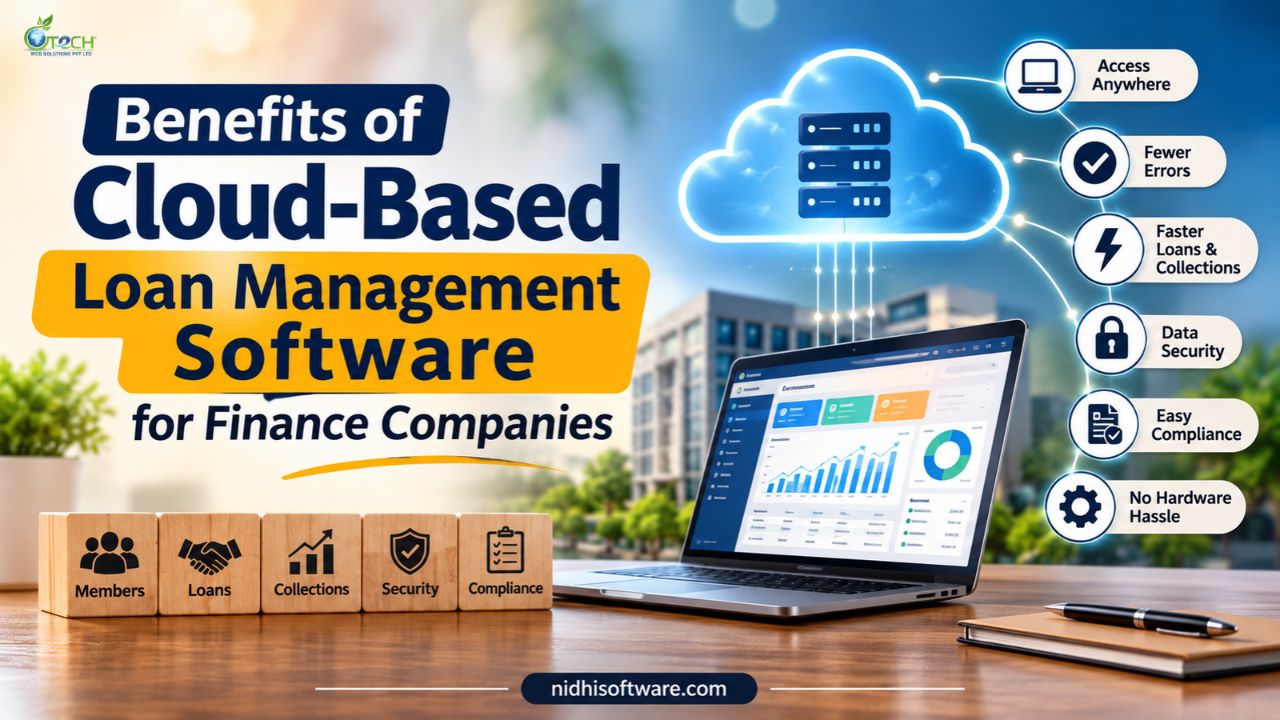
A few years ago, “Nidhi software” usually meant a program installed on one PC in the head office. Cloud-based software works differently. It lives on the vendor’s servers, and you open it in a browser or an app. For a Nidhi with more than one counter, six things change.
-
Everyone sees the same number, at the same time
Your cashier, your collection agent on the road and you at your desk all look at one live ledger. The phone call that begins with “what was yesterday’s closing at the branch?” disappears. If you plan to open more branches, this matters even more, because the Nidhi Rules tie new branches to a record of profits, and you’ll want clean branch-wise numbers to show for it.
-
Fewer errors, fewer awkward arguments
Most member disputes start with interest calculation. Software calculates it the same way every single time, and the audit trail records who changed what, and when. So when a member insists his balance was higher last month, you open the account history instead of arguing from memory.
-
Loans move faster, and so do collections
A digital workflow carries a loan file from application to sanction without a paper trail sitting on someone’s desk for days. Collections improve too. SMS or WhatsApp reminders go out before the EMI date, and each agent starts the morning with a list of people to visit. A reminder won’t replace a good relationship, but it does take away the “I forgot” excuse.
-
Your data stops living on one fragile PC
One hard-disk crash, one power surge or one theft can erase years of records on a local machine. A cloud setup keeps backups away from your premises. Role-based access adds another layer: your cashier can see balances but can’t change an interest rate. Don’t take the vendor’s word for any of this, though. Ask them to show you how backups and permissions work, on screen.
-
The half-year return stops being a scramble
Because every transaction lands in one database, the member count, the 1:20 ratio and the term deposit position are a few clicks away all year round. You don’t find out at half-year end that you slipped out of line three months ago.
-
No server to buy, no IT person to babysit it
You pay a subscription instead of buying and maintaining hardware, and the vendor handles updates and security patches. There is one honest downside: cloud software needs internet. Before you sign, ask what happens at a branch when the connection drops, and how fast the data syncs once it returns. A vendor with a clear answer has probably met that problem before.
How to Choose a Nidhi Software Company
Every vendor has a good-looking dashboard. Dashboards don’t run a Nidhi. Here is what separates the serious ones from the rest.
1. Does it actually know Nidhi rules?
Test this first, because it separates specialists from everyone else. Ask to see the member-only restriction, the 1:20 alert and the term deposit tracker in the live product, not on a slide. If the answer is “we can customise that for you later,” you are looking at a generic tool in a Nidhi costume.
2. Is it one system, or several stitched together?
Members, shares, deposits, loans and accounts should share a single database. When deposits live in one app and accounts in another, somebody is retyping figures between the two, and retyping is where mistakes breed. Cheap bundles of separate tools usually fail right here.
3. Who moves your old data?
You aren’t starting from zero. There are years of member records and loan balances sitting in registers or Excel files, and getting them into a new system is the hardest week of the project. Find out who cleans and uploads the data, how long it takes, and how you will check that opening balances match to the rupee. A vendor who suggests running the old and new systems side by side for a short while has been through this before.
3. What happens when something breaks?
Software problems don’t show up during the demo. They show up at 5 p.m. on the last day of the month. So ask about support hours, response times and staff training, and whether the team can talk to your employees in the language they are comfortable with. A brilliant product with a silent helpline is a bad deal.
4. Where does the data sit, and what does it really cost?
Company law has rules on where backups of electronic accounting records must be kept, so ask your CA, and ask the vendor where its servers are. Then get the pricing in writing: setup fee, per-branch or per-user charges, the cost of custom reports and the renewal terms. A low headline price with a long list of add-ons isn’t cheap. It is just late billing.
What to Expect From a Nidhi Software Free Demo
A free demo costs you an hour, which makes it the cheapest research you will do. The catch is that a canned slideshow shows only what the vendor wants you to see. So hand them your own script. This one works:
- Register a new member and watch the live member count move.
- Open a recurring deposit and a fixed deposit, and see how the interest is worked out.
- Sanction a secured loan, generate the EMI schedule and record two payments, one on time and one late.
- Try to lend to a non-member. The software should say no.
- Close the loan, then print that day’s day book.
- Pull the report showing member count, the 1:20 ratio and the term deposit position.
If the software handles all six without a workaround, you have found a serious contender. If you hear “that module is coming soon,” write it down and keep comparing.
Bring your cashier and your accountant along. The people who will use the system every day catch problems that owners walk straight past. A nidhi software free demo from Gtech Web Solutions is built for this kind of hands-on check, so you can throw your own questions at the team and watch the nidhi software solution run on your process instead of a sample.
Is Nidhi Software Worth It for a Small Nidhi?
Fair question, and the honest answer depends on your plans. With two hundred members and a single counter, a register and a careful clerk can get by for a while. But every month of data you add makes switching harder, and the compliance numbers get harder to produce by hand as deposits grow. Starting clean is cheaper than migrating a mess later.
One caution from the other side. Software won’t fix a badly run Nidhi. It just shows you the problem faster, which is useful, but only if you are willing to look.
Mistakes to Avoid When You Leave Registers and Excel Behind
- Migrating messy data is the classic one. Duplicate members, missing loan entries and balances that never reconciled don’t vanish in a new system. They come along for the ride. A week of cleanup before migration saves a month of confusion after it.
- Then there is the training gap. Even excellent software loses to the cashier who quietly goes back to the register because “it’s faster.” Train everyone, and pick one person per branch to be the go-to expert.
- Buying on price alone is another trap. The cheapest option often leaves out the one report you need at half-year, and you pay for it later in overtime.
- Last, timing. Month end is chaos. So is the week before a return is due. Start at the beginning of a month or half-year, and run the old and new systems side by side for a short stretch.
Questions about Nidhi Software
What is a nidhi software solution?
It is a system that manages a Nidhi company’s members, share capital, deposits, loans, accounts and statutory reports in one place, with the Nidhi rules built into the workflow instead of bolted on.
Can Nidhi software lend to non-members?
It shouldn’t. The Nidhi Rules limit deposits and loans to members, so good software blocks non-member transactions at the source.
Is cloud-based Nidhi software safe for financial data?
It can be, if the vendor uses role-based access, audit trails, encrypted connections and regular backups. Ask to see each one working. A promise on a brochure proves nothing.
How long does it take to start using a nidhi software solution?
That depends on how much data you have and how many branches you run. A clean member list and loan file speed things up a lot. Ask for a written plan with dates.
Conclusion
Nidhi software isn’t a fancier register. It is one connected chain that follows a member from KYC to deposits, loans, accounts and the half-yearly return, while keeping you inside the 200-member, 1:20 and 10 percent rules. Pick a nidhi software company that treats those rules as part of the product, test it on your own scenarios, and check its support before you sign. Ready to see it in action? Book a free demo with Gtech Web Solutions and run the six tests above with the team.